Automated File Integrity Monitoring Deployment Using Ansible on Wazuh
Overview
| Operating System | Ubuntu 24.04.3 LTS |
| Tools | Ansible, Wazuh Stack |
This Ansible role (designed by me) enables rapid configuration of File Integrity Monitoring (FIM) in Wazuh and automatically deploys a prebuilt minimalist dashboard for investigating file integrity events. With this solution, you can define the file paths or directory structures you want to monitor. After a quick deployment process, you will immediately gain visibility into all modifications affecting the configured files and folders.
Deployment
Note: All deployment steps will be executed on the Wazuh Linux server instance.
1. Clone the Repository
Clone the SiemCrafter repository from GitHub:
git clone https://github.com/ottolukacs/SiemCrafter.git2. Navigate to the Role Directory
cd SiemCrafter/wazuh/fileintegrity-inspection/3. Configure Agents and Paths
Edit the group_vars/all.yml file and define the agents and file paths you want to monitor. Within the integrity_checks variable, you can specify which host(s) should participate in file integrity monitoring. After defining the agent, you can list the directories or files that should be monitored.
sudo vi group_vars/all.ymlExample configuration:
# Defined hosts and paths for monitoring
integrity_checks:
  - agent: all
    directories:
      - /opt/something
      - /opt/file.md
  - agent: host1
    directories:
      - /home/ubuntu
4. Configure Wazuh Credentials
In the same group_vars/all.yml file, edit the Wazuh credentials section so the automation can authenticate against the Wazuh Dashboard API.
# Wazuh credentials
initial_user: "admin"
initial_pass: "SecretPassword"
To protect your credentials, encrypt the file using Ansible Vault:
sudo ansible-vault encrypt group_vars/all.ymlTo edit the encrypted file later, run:
sudo ansible-vault edit group_vars/all.yml5. Run the Playbook
Run the Ansible playbook with the --ask-vault-pass option to be prompted for the Vault password:
sudo ansible-playbook start.yml --ask-vault-passNote: To enable real-time forensic monitoring, install and start auditd on the monitored endpoints:
sudo apt install auditd
sudo systemctl enable auditd
sudo systemctl start auditd
Usage
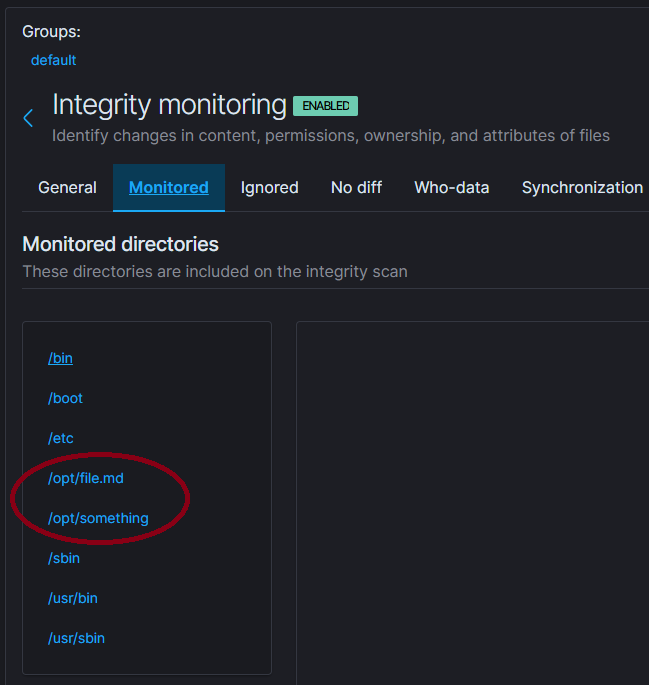
If the playbook runs successfully, you can verify the integrity check status of the affected agents in the Wazuh Dashboard Agents section. The directories and files defined in the Ansible .yml file will now be actively monitored:
Example Test
On a monitored workstation:
ubuntu@node1:~$ sudo echo "This is a test line" | sudo tee /opt/file.md
ubuntu@node1:~$ sudo rm -f /opt/file.md
Now open the “SiemCrafter: File Integrity Dashboard” created by the Ansible role from the dashboard list in the Wazuh.
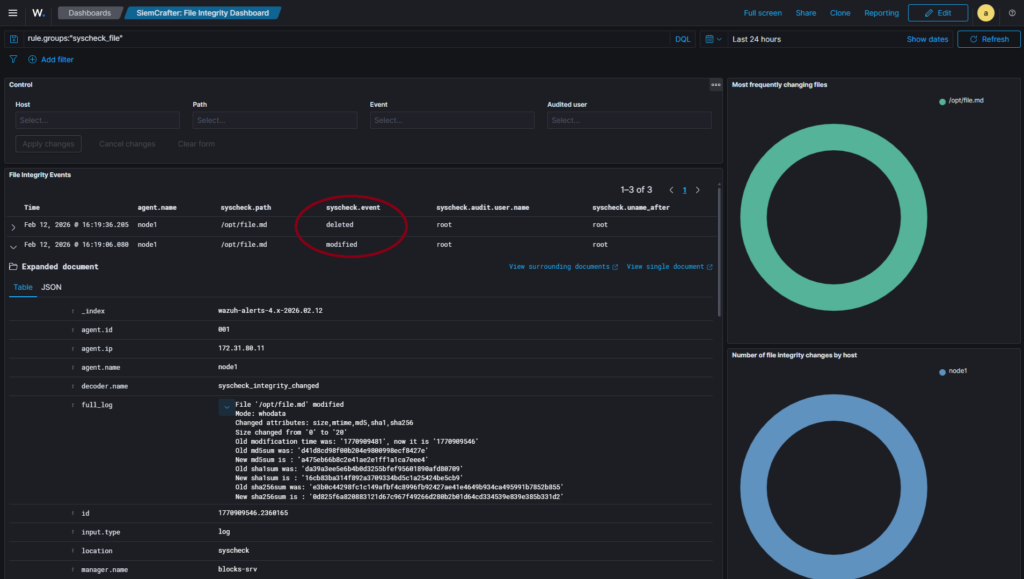
You can also find and investigate the alerts in the Discovery section.
Idempotency: The Ansible role performs idempotent modifications. If you add new paths, modify or delete existing ones, or update host definitions in the inventory file and rerun the playbook, the changes defined in the /group_vars directory will be applied automatically and consistently.
Under the Hood
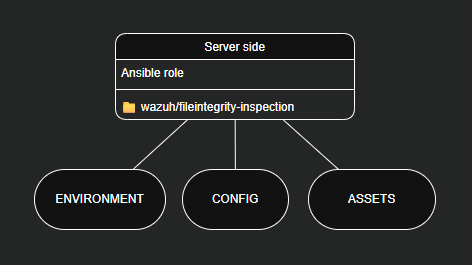
The Ansible playbook executes the role located in the roles directory. All my automation solutions are designed to extend SIEM functionality using a modular server-side logic model. In this case, the CONFIG and ASSETS components are responsible for achieving the desired functionality.
roles/deploy-fi-inspection/tasks/config.yml
---
# Configuration
- name: Insert a configuration block into the file
  when: inventory_hostname == "wazuh-manager"
  ansible.builtin.blockinfile:
    path: /var/ossec/etc/shared/default/agent.conf
    marker: "# {mark} ANSIBLE MANAGED BLOCK – Siemcrafter: fileintegrity-inspection"
    block: |
      {% for integrity_check in integrity_checks %}
      <agent_config{% if integrity_check.agent != "all" %} name="{{ integrity_check.agent }}"{% endif %}>
        <syscheck>
          {% for dir in integrity_check.directories %}
          <directories whodata="yes">{{ dir }}</directories>
          {% endfor %}
        </syscheck>
      </agent_config>
      {% endfor %}
This configuration updates the Wazuh Centralized configuration file (/var/ossec/etc/shared/default/agent.conf) to distribute file integrity monitoring settings to the selected endpoints.
roles/deploy-fi-inspection/tasks/assets.yml
---
# Assets
- name: Waiting for Dashboard API
  when: inventory_hostname == "wazuh-dashboard"
  ansible.builtin.uri:
    url: "https://localhost/api/status"
    method: GET
    headers:
      Authorization: "Basic {{ (initial_user ~ ':' ~ initial_pass) | b64encode }}"
    validate_certs: false
  register: kib_status
  retries: 20
  delay: 20
  until: kib_status.status == 200

- name: Import Dashboard Assets 1
  when: inventory_hostname == "wazuh-dashboard"
  ansible.builtin.uri:
    url: "https://localhost/api/saved_objects/_import?overwrite=true"
    method: POST
    headers:
      osd-xsrf: "true"
      Authorization: "Basic {{ (initial_user ~ ':' ~ initial_pass) | b64encode }}"
    body_format: form-multipart
    body:
      file:
        filename: "visualization.ndjson"
        content: "{{ lookup('file', role_path + '/files/visualization.ndjson') }}"
    status_code: 200
    validate_certs: false
This automation waits for the Wazuh Dashboard API to become available and then imports the predefined dashboard and its visualizations via the API.
Summary
This solution provides a fast, structured, and repeatable way to configure file integrity monitoring across multiple Wazuh agents, automatically deploy a dedicated File Integrity Dashboard, and maintain consistency using idempotent Ansible automation.